Showing posts with label ad. Show all posts

Wednesday, April 27, 2022

What to Do to Prevent a Crisis While Being Successful on Social Media [Easier than you Think!]

You are successfully running a social media account for your company and you want to attract more attention to it, but you don’t want to accidentally cause a social media crisis. I’m here to help you learn how to prevent a social media crisis and if one does occur, then you will know what you should do to handle the situation with care.
Social Media Crisis

No matter how anybody looks at it, including you, every person or company that has a social media account is susceptible to experiencing a social media crisis. It's something that can't be fixed normally and sometimes, you might have to take extreme measures. Here are a list of things you can do right now to help protect your account(s) and to help prevent any crises from happening.

Creating Policies for Your Social Media

Sometimes, in your company, you may have an employee that either intentionally posts something that's not good at all to say, or your employee accidentally posts something wrong that you can't undo. This is where your company policies come into play. You need to make sure that your employees know how to handle customer comments online and that they don't expose any confidential data too. Lastly, according to Oracle Netsuite, make sure that they know how they should (Get approval for company-related posts, comply with copyright laws on social media, include or withhold company information on social media profiles, and react to PR crises on social media.)

Make your Accounts Secure!

The main thing you should do here is make sure the passwords you choose to make are strong ones that nobody will find out. After that, I highly suggest that if a website offers Two Factor Authentication, then set that up immediately afterwards! That way, it will add an extra layer of security to make double sure hackers can't get into your account.

Being Proactive with Hashtag Campaigns

Hashtags are a great thing to use on any posts you make on social media, or even YouTube videos! Just make sure you do your research on the currently trending hashtag before you decide to use it in any of your posts, because it could, and might, be talking about the exact opposite meaning of what you originally thought it meant, and using it wrong could backlash your company severely.
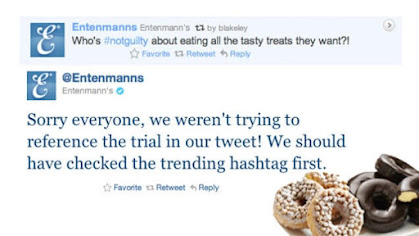
Entenmanns Not Guilty Tweet

Don't Capitalize on an External Crisis

What this means is that if there is something serious going on somewhere in the world right now and a hashtag was created and used to relate to it, do not use the hashtag to promote your own business because it will never go over well.
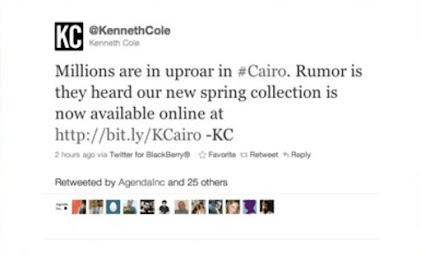
Kennith Cole Cairo Tweet

Define what a Crisis is according to Your Company

Not every little thing that happens can be considered a crisis, especially if a customer that didn't have a very well received phone call decides to take their anger out by posting something not so nice about the company on social media. Something like that can easily be fixed by contacting that customer directly to help solve their problem and hopefully clear things up.

Create a Crisis Plan for Emergencies

Going in, head first, without any idea as to how you'll solve your social media crisis is definitely not a good idea. You should make a plan for your company to follow if something like this were to arise, that way; you can try and resolve the problem quickly before it gets any worse. Usually, a social media crisis does not need to involve your whole company; this is where you can create a team to help fix those problems. Make sure though that as you're building your team, that you think about what their responsibilities will be which are: (Looking out for and monitoring cases, actively managing social media and answering questions, guiding the overall strategy and updating key leadership, and responding to questions from other channels such as email and handling media requests.)


What to do During and After a Crisis

First thing to do is not panic because you have a plan for what you'll do. Regarding what to do in and after a crisis, you need to acknowledge that there is an actual issue occurring. This is where customers would like to know if the company is aware of what's happening and if it affects the customers at all too.

Secondly, stop any scheduled posts from posting. It will just look bad on your part if you don't remember to stop your scheduled posts because it might look to your customers like you're just ignoring what's happening around you.

Usually when people post negative comments online, you do not answer them at all because they're just trying to be heard or vent off on you. If you do answer the negative comments, then limit the amount of answers you reply to to one or two responses. In this case, the public will notice that you are responding.

Make sure that you keep your team up to date on what's happening before they find out through a series of posts online before you get to tell them. You should tell your team what's happening, where it's happening, and if the team should take any action.

After the social media crisis is all over, you can review what happened with your team from start to finish. The point is, if a social media crisis happens, then there is definitely room for improvement and you can figure out what happened and how it can be improved upon by you seeking input from your other team members. I hope all of this new material will be useful for you to use if you're just starting up a company or if you're just looking for some insight on what to do. :D

Wednesday, April 20, 2022

What is Social Media Advertising and How to Reach New Audiences with It [Easy, Follow-along Tutorial]

Right now, you may be thinking "what's the difference between normal social media posts versus social media advertising?" Well that's why I'm here to tell you all about social media advertising and why it's great to use for advertising your company's products or services to new and returning customers.


What is Social Media Advertising?

So what makes social media advertising different from normal advertising in the first place? To start off, when you make a normal post online, those posts usually only reach the audience you have that currently follow you online and it does not reach any new customers that you may be trying to reach out to. Social media advertising posts, however, are paid advertisement posts that not only reach out to the people that follow you or your company, but they also reach that part of the audience that is unaware of who or what your company is.


How Does Social Media Advertising Work?

There are five things to remember if you want to make sure your advertisement posts are successful.

1. Campaign Overview.

This includes making sure you have a campaign outline (the generic, but very important, details about your campaign: Name, purpose, goals) and your campaign's objectives (for example: "What are you trying to achieve through the campaign?").

2. Target Audience.

According to Toolbox.com, you need to be specific about your audience that you are making your advertisement posts for because each and every audience reacts differently towards the different types of content you post.

3. Campaign Creatives.

Another way of putting this is that campaign creatives are ad copies, what you would use for messaging, and visuals, which could be anything from images, gifs, and videos. Depending on which platform you decide to post your advertisements on, keep in mind that each and every platform not only has different guidelines, but also each one has a bigger, different target audience than the other. You might try and go one step further by creating a duplicate post but tweak it just a little bit to see how it will optimize its performance.

4. Social Media Platforms.

Speaking of social media platforms, each platform is designed to work differently from another. Obviously, the more popular platforms are YouTube, Instagram, and TikTok, but they all serve different audience segments. Each platform will help you figure out what your budget will be for each advertisement campaign, what type of format you should choose for your ads, and it will also help you to tailor your campaign's message for every individual platform.

Social Media Icons


5. Campaign Budget and Success Metrics. 

It's good to know what you're spending your money on, especially if you'd like to know whether you should change anything. Any fees or expenses you make towards your ads should be kept separate from your actual budget (that is if you're working with an agency to do your advertisements instead of making them yourself.) The other thing to keep in mind is what your budget is for your advertisements. This number also includes any other amount of money that you have to pay the platform you're using just so they can keep on running your ad. It may take a while to figure out your budget for your ads, but Toolbox.com has made it easier for you to figure out those numbers. Here's their example:

"Let’s say you need to generate 20 leads through a lead generation campaign. Through research, you find out that the cost per lead (CPL) on Facebook is $10. So, the initial budget for the campaign would be $200. Considering the volatility of the bidding process, you can slightly increase the ad budget. As you execute the campaign, keep tweaking the bid to optimize the ad spend."

Best Practices for Social Media Advertising 

When starting out creating paid advertising like this, here are some best practices to keep in mind when putting together those ads:

1. Experiment on your Normal Content First.

Before you start making a paid post, try experimenting on your current content and see if you get any new reactions to it. If so, then I say that it'd be safe to go ahead and try it with paid advertising.

2. Getting Ultra-Specific with Audience Targeting. 

As creepy as this might sound, you can get very specific about your target audience and even target people based on their location, what type of content they watch or look at, and places they visit.

3. Create Multiple Ad Creatives. 

Don't just limit yourself to creating one advertisement layout because you couldn't choose one over the other. Go ahead and make as many as possible. That way, you can test out which ones work and which ones don't.

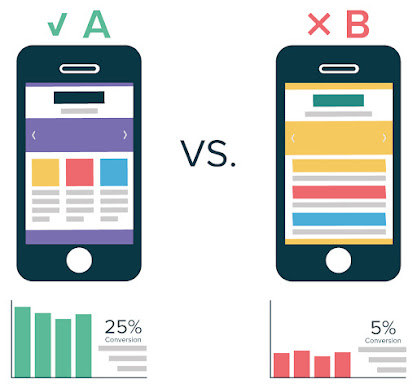
A/B Testing which website layout works better.


4. Design Attention-Grabbing Creatives. 

Make all of those creatives you just made eye-catching! Colors, icons, fonts, the list goes on! Customers will notice when something pops out and sticks out from the rest and that'll make them want to know more!


I hope all of this helps to teach you more about social media advertising and what the power of advertisement can do!

Wednesday, April 13, 2022

How to Create Strategic Social Content [Easy and Fun to Do!]

So, you want to start creating content, but you have no idea where to start or what to do. Well, you came to the right place! I will be teaching you the basics to creating a strategic social content plan and what you should and shouldn't do with your content.


What are My Goals?

You may already have your reason as to why you want to make content, but just in case, ask yourself, "What is it that you want from social media anyways?" Are you doing it because you are obligated to, or are you just doing it for fun like I do with my YouTube channel? For me, I feel like some people don't have a clear thought in mind on what they really want to make content on and they are just doing it because they feel like they have a responsibility to. Most of the time, however, I can tell that most people keep on doing what they love doing because it's fun! To reiterate again, make sure that whatever you're doing, only do it if you believe that you will have a blast doing it again and again!


Who is My Audience?

Once you figure out your goals that you came up with for your content, you need to figure out who your target audience is going to be. According to SproutSocial, only 55% of marketers, that's us, use social media data so that we can understand our target audience better. It might seem like a long and tedious thing to do, but in the long run it will definitely pay off because you will have a better idea as to what your audience pays attention to more and which types of social media platforms to use more than the others.


What are Metrics and How Do I Use Them?

Right now, you're probably wondering what I mean by metrics and what use you have for using them. It's relatively easy to figure out. Basically, you're paying attention to your content's reach, clicks, engagement, and hashtag performance. Reach is the amount of people that actually saw your content. Clicks are the number of clicks on your content itself. Engagement is the number of interactions with your content divided by the number of impressions. It's also a better way of seeing how your audience sees you and if they want to interact with your content.


Choosing My Content

There are many different types of content you can create to catch many different people's attention. There are blog posts, GIF images, photos, video clips, full videos, infographics, and many more. Currently, the most popular type of content that is out there is videos. According to HubSpot, 82% of internet video traffic currently makes up that much of the total consumer internet traffic this year. I'm not saying you can't make content with anything else other than video, but it might not get as much traffic as you would have originally liked. All in all, stick to making the type of content that you believe will work the best with your image in mind.

Discord's Twitter Tweets

Timing is Everything!

The time of day and the day of the week are really important in figuring out when your target audience is online and using the internet the most. When you post your content online, you need to be ready to engage with your audience, so if you were to choose to upload content late at night, not only would that not be a very good time to post said content, but nobody would be ready to respond to anything either. The other thing you need to remember to do is if someone responds back to your online content, you need to respond back ASAP. Otherwise, they possibly won't believe that you are the best at what you do.

Timing is everything picture. Long hand is pointing at "Too Late".

What's Next?

Now that you have figured out all of the previous sections I mentioned above, now is the time to look at what content is working, what content is not working, and lastly, how you will try to improve on what you can do better. This mainly wraps around your content that is performing very well and making any needed adjustments to other parts of your content that you know you could do better on or the content that didn't do so well , but you now know what you need to do to make it work and make it even better!

Thank you so much for reading this post, everyone! I hope this all helps you in figuring out what type of content you want to make and also how and where you're going to post it online.

Thursday, April 7, 2022

What is Social Media Listening and Steps To Make it Work [6 Ways to Make Social Listening Easier!]

So, you may be wondering or asking yourself "What is social media listening and how do I use it?" Well, you came to the right place because that's what I'm going to talk about with you today. Not only that, but I'll also help you make it easier to learn why it's good to do some listening.

What is social media listening? Well, besides the fact that some people call it social listening for short, according to Cyberclick, it's basically the continuous monitoring and analysis of social media channels for positive and negative mentions and feedback about your company's brand, products, services, and then using that information to take action. This means that you're constantly looking out for specific words or keywords that someone online may mention, whether they relate to your company or your competitor's company.

Here are the steps you need to take into consideration when learning how to do social listening:

  1. Choose a tool.
  2. Choose your keywords.
  3. Choose your platforms.
  4. Analyze and take action.


1. Choosing a Tool

Regarding how you'll keep track of when someone online mentions your business, you will need a tool to monitor keywords, phrases, and topics that relate to what your company does. An example of a tool that would work and be easy to work with would be HubSpot because it gives you a lot of the important measuring factors for you to use like what was mentioned up above.


2. Choosing your keywords

Keywords are what help an article or YouTube video become more known to the public by you entering words that you believe other people will use to find said article or video in the first place. Another way of simplifying what I mean for finding what you can make keywords from is taking your brand's name and handles, your product's names, and even their misspellings, your competitors' brand names product names, and handles, industry buzzwords, your company's slogan, campaign names, and lastly, even unbranded hashtags that are related to the industry.

YouTube video tag section


3. Choosing your platforms

Now after all of the preparations you've made, you've got to choose where you will be conducting your listening. There are a lot of social media platforms to choose from, but it would probably be best to use the most well known ones instead since you know what to expect from them. Now there are two different approaches to this: B2B and B2C. If you choose to go the route of B2B (Business-to-Business), then you'd be better off with choosing LinkedIn, Reddit, Twitter or YouTube to get the word out there to other businesses. If you choose B2C (Business-to-Consumer), then utilizing all of the platforms including Facebook and Instagram, will help you to reach an even wider audience.

YouTube and Twitter Icon


4. Analyzing and taking action

After all of what you've learn so far, make sure that it all doesn't go to waste. As long as you keep on checking your data and what you collected from listening, then you should be golden. All in all, everything that I've talked about will help influence the decisions you make, so make sure that you make great decisions!


Before I Go

Before I go, I just wanted to let you all know about some benefits of conducting a social media listening strategy and what this means for you.

So far, all I've found for the benefits conducting this gets you are six different benefits:

  1. Increased engagement opportunities with target audiences.
  2. Track and oversee trends.
  3. Crisis management.
  4. Keeping an eye on competitors.
  5. Finding influencers.
  6. Event tracking.


Increasing Your Engagement

Going along with increasing your chances to engage more with your audience, it will help you to understand more of how your customers think and what you believe they will want from you next.


Paying Attention to Those Trends!

The main thing to take from trends is that it can help you grow your research and development team, public relations team, and in taking your company to new heights in new directions!


Crisis Management


If something bad happens, like a customer doesn't like a product and more and more people follow them in the backlash towards the company or if something bad happened to the company, you should always be ready for anything to happen by taking your time and assessing what went wrong and how or if there's a way to fix that wrong.


Knowing What Your Competitors are Doing

If you use keywords that relate to your competitor's products, then it can help you find if the other company has any weak spots that you can then use to your advantage.


Influencers!


You see this all the time, whether it's on TV or your phone, you always see a commercial with some very well known actor, sports player, etc, showing how much they love using this company's product or service. It does take a lot of paperwork to hire someone to be in a commercial, but they can gain a lot of attention faster than one might think to help your brand thrive!


Event Tracking

This one is especially helpful if your company has an event that they are hosting. It helps you to better know how people feel before, during, and after the event happens and what the customer experiences. If something needed to be improved on, now would be the time to address it.

I hope you all were able to make sense of what I have written in my blog post today and I hope y'all were able to talk something from this and be able to apply it to your daily life. Anyways, I hope y'all have a nice day! :D

Wednesday, March 2, 2022

What is A/B Testing and How Does it Help? [A/B Testing for YouTube Thumbnails]

A/B Testing

A/B testing, by my definition, is where you are trying to advertise one thing, but are showcasing it two different ways, and figuring out which way of advertising brings in the bigger audience over the other.

Laptop comparing A to B

This helps in a big way because you may like sticking to one way of advertising something because that is always the way you have been doing things or it may just be because you like how it looks. In this instance, that's not always the case. Sometimes, different visuals appeal to the audience in different ways than one might think. For instance, I have been making YouTube videos now for almost 10 years and I've never stopped doing it because it is fun and exciting! There have been some times where I can't choose a thumbnail and I will end up having two different versions that I like, but can't choose by myself.

Jacob Fuller's Discord Channel A/B testing YouTube thumbnails


TubeBuddy

TubeBuddy, which is a great source to use on YouTube, gives some more insight into what you should look out for when doing an A/B test. One important thing to note that they mention is that even if you do an A/B test with the same video and different thumbnails, you will definitely get different results every time because every person is active different times of the day and different days of the week which will change your results a lot.

So, when making a YouTube thumbnail, each part of the uploaded video gets put into consideration: The title of the video, the description you added that most of the time describes what the video is about, and the tags. By tags, I mean short terms that a person searches for on the search bar in YouTube that helps them to find your videos.

Take into consideration, if you were a YouTuber that makes videos that are focused towards younger kids, you would want to make the thumbnails colorful and have the cartoon characters they love somewhere on the thumbnails too. If you were to make a different thumbnail that did not have anything at all that kids liked on it, and it was black and white, there is no way that they would want to click on a thumbnail that didn't make them happy.

You may have thought that I forgot to mention how A/B testing helps. Well, don't worry, that's where I'm getting to right now.


How Does This All Help?

The way A/B testing helps, whether it is for digital marketing advertisements on websites or if it is for comparing how different thumbnails bring in different audiences on your YouTube channel's videos, they both basically are doing the same thing. They are comparing CTRs. A CTR is short for click-through-rate and that is determined by how many people out there see your ad and click it because they want to learn more about your advertisement. CTRs are the most basic thing A/B tests start analyzing. The next thing they look for is where and when your audience is clicking your ad from. Every person, as I said before, is active during different times and days of the week, so the results will still differ every time. Say, if your main audience on YouTube watches your videos mostly on Friday nights at 5:00 PM CT, then that's when you would want to upload your videos because if you were to upload your videos any other time of the day or on a different day, even with the thumbnail that would have grabbed their attention, it won't bring in as many people because they are not expecting you to release anything on a different time schedule than what you have already planned.

Lastly, I know I have not mentioned this at all yet, but the last thing that gets put into consideration is the different traffic sources that your advertisements get put on. Not only do my YouTube videos send out notifications to my subscribers that I uploaded a video, but it also sends out a tweet to my Twitter too for anybody that follows me on there so they will also know I just uploaded new content. Continuing the A/B test through different sources, you will still get different results because your audience won't know what to think right away since they usually know how your thumbnails are designed and if they look different from usual, there will be less CTRs.

If you take all of these considerations into mind, then you will be able to successfully create an advertisement (or YouTube thumbnail) that will appeal to your audience the way you want.

Wednesday, February 23, 2022

How to Make Paid Search Advertising Easier to Understand [Fun and Easy Steps Everyone Can Follow!]

Have you ever wondered what paid search advertising is and wanted to know more about it? Then you have come to the right place! Not only will I tell you more about it, but I will also help to make it easier for you to understand so that it will become second nature to you!

Paid Search Advertising

What is paid search advertising? According to AdRoll, it is a marketing tactic in which advertisers pay search engines for ad placements on SERPs and SERP stands for Search Engine Results Pages which means anything that shows up on a web page when you are searching for something on the internet.

When it comes to figuring out where your advertisements are going to be placed on SERPs, there are 6 different things that help determine its placement.

  1. Bids
  2. Ad & Landing Page Quality
  3. Ad thresholds
  4. Popularity of Keywords
  5. Context of Search
  6. Impact of Ad Extension

Bids

For a bid, it works like an auction between businesses. Each business bids on keywords and phrases that relate to their products and services. How they work is by PPC, which stands for pay-per-click and the businesses only have to pay money when someone clicks on their advertisement.

Hands holding "Bid" signs at an auction with a hand holding a gavel

Ad & Landing Page Quality

Ad & landing page quality. With how smart phones are a thing this day in age, the more mobile-friendly a website is, the better quality score it gets especially with how relevant and useful Google considers it to be. If you know how to create a website with HTML and CSS, then I would say you're golden!

Two phones. One has a mobile-friendly website and the other phone doesn't

Ad Thresholds

For ad thresholds, there is not a whole lot I'll be able to explain about it, but I'll try my best to teach you about it. The ad quality, ad position, user signals and attributes, topic and nature of a search result, and related auctions are all part of ad thresholds. I believe this is all of what makes up an advertisement and each part should be taken seriously when you are considering how your audience will see your finished advertisements on the internet because those ads will reflect how they see your company.

Popularity of Keywords

In terms of the popularity of a keyword you have added to your advertisement and website, if another advertisement has the same exact keyword, then it all comes down to who can pay more money for it because that higher bidder will win the auction at that point.

Popular keyword rankings an popularity trends rising

Not only does Google take into account what you are searching, but it also is considering how and where you are searching. What I mean is is that your location, time, search term, what type of device you are on, what the nature of your search is, what other advertisements are competing with you, and search results from your search are taken into account to help you get the best result they believe you were looking for.

Ad Extensions

Ad extensions are very helpful in ways that you would have not ever thought of before. There are many different extensions that do many different things. According to HubSpot, here's how they describe each extension. There's the call out extension which allows customers to highlight specific points about a person's business, products, or services that can be shown alongside the company's advertisement on a Google search. A site link extension is what appears beneath your text ads and directs users to specific pages on your website. An example of one might be a "Buy now" link to a product that shows up as a result on Google. A price extension shows prices of products or services to help make informed decisions about the product or service. This might also include showing the availability of a product currently and the rating along with how many ratings it has.

The location extension provides an extra line in your businesses advertisement and highlights where your businesses location is. Structured snippet extensions are provided by the advertiser, but show information in a structured format that they show with your advertisement. Promotion extensions are what make it easy for a business to keep up with their promotions without having to create a whole new advertisement. The good things that paid search advertising brings to fruition are that there are always high-intent audiences. In other words, no matter what keyword you might try researching on the internet, there will always be a way to reach the type of audience you desire. You save money when making your advertisements because the market is what dictates the price for ads. Lastly, you'll start seeing results right away since there's no need for you to persuade any new customers online since you'll be the one giving them a shorter path to checkout.

Wednesday, February 9, 2022

How To Successfully Create a Targeted Advertisement [3 EASY STAGES]

Before ad targeting really became a successful thing everyone used, putting out an ad to show off your current business, for one thing was all the same price, no matter how big or small the ad was. The price, on the other hand, was very expensive to afford and not a whole lot of people utilized ads because of that reason. Once people started realizing that we needed advertisements to keep our businesses going and to spread the word about them too, then I believe that's also when the prices for buying an ad actually started reflecting what they cost today. This is just a little back story of how ad targeting used to work, and I am here because I want to put your mind at ease and teach you that you can easily create an ad in 3 easy steps towards the audience you want!

Before you get started following the steps to create a successful targeted ad, you need to make sure you set a goal. Think to yourself right now, 'Who am I, and what do I want to accomplish?' This is something I came across from a website called AdRoll and I think it's important to know who you are and what you would like to accomplish when you make this advertisement. Now that you have figured out who you are and what you want to accomplish with your ad, let me teach you these three easy steps to creating a successful targeted advertisement!

1. The Awareness Stage

Using the resources I have collected from the website HubSpot, this is what they call The Buyers' Journey and it is separated into three different stages (or steps if you prefer). The first stage is called the Awareness Stage. This is when you should look to see if your company is struggling anywhere and if they are, then you need to address that problem and make sure to utilize that problem in the next stage.


2. The Consideration Stage

There is a reason why I mentioned that you need to use your company's problem in this next stage. This stage is called the Consideration Stage. During this process, this is when you will need to figure out how to explain to the people that are viewing your advertisement how you will be going about solving your company's problem. I would highly suggest making sure you explain it thoroughly to the public and not leave out any details you believe would be very important for them to know.

A group of people trying to brainstorm what the company's problem is.

This is one of the most important stages in my opinion because it gives the viewer just the right amount of information that they would need to understand how you go about solving your company's problems and these targeted advertisements help you to create a relationship with your brand, not only just with people you have interacted with before. These ads should be pointing more towards branded content just to reiterate that if I was not clear enough. All in all, every stage is equally important.

3. The Decision Stage

The last stage in creating a successful targeted advertisement is the Decision Stage. The decision stage is actually quite common that you would not even realize that you see one all the time. They are on television, YouTube video advertisements, and more! Catch where I'm getting at yet? Commercials! The decision stage is when you communicate to the public what your company has started to offer. This can be anything you want to bring to the light. For instance, I love Nintendo products and they have some pretty good commercials on TV. They showcase what each game or console they are selling has to offer to us. That can be showing off what features the products have that we would not notice right away or they could be announcing a brand new game that is coming soon, like a game called Splatoon 3.

Nintendo Switch Advertisement

Just for Fun!

This last part is extra and you can have as much fun as you want with this. Be creative when going through each stage of creating a successful targeted advertisement. Even copy off of what trends are currently popular right now and that will most likely give you the starting boost you need to make this successful! Even possibly put some money into your advertisements if you are feeling a little bit adventurous because even if the advertisement fails, you will hopefully have a somewhat better idea of how much you should spend on it in the future and how much you should change the way the advertisement looks to better suit your targeted audience.

Call-to-Action Buttons